TimelinesAI WhatsApp Integration & Automation features

Automate your processes with TimelinesAI, manage WhatsApp for your business and improve your sales and customer support teams.
Checkbox 1
Get a shared inbox for multiple WhatsApp numbers
Checkbox 1

Integrate with Pipedrive/ Hubspot/ Zoho/ monday.com in one click

Checkbox 1
Integrate with any CRM or tools with API and webhooks
Checkbox 1
Automate your workflows via TimelinesAI native WhatsApp & Zapier integration
Checkbox 1
Send personalized mass messages on WhatsApp
new main illustration 1 e1690290628352 508

500+ brands across 34 countries use TimelinesAI

Capterra rating score : 4.5 of 5 based on 50+ reviews
MultiDevice Whatsapp Shared Inbox for Teams interface 2048x1538 1 1

All WhatsApp correspondence in one interface

Get immediate control and a 360° view of your business communication on WhatsApp. Collaborate with team members in minutes with multi-number Shared inbox.
Checkbox 1
Add multiple WhatsApp numbers in one Inbox
Checkbox 1
Collaboration tools for collective management of your chats: assigning, segmentation, labeling chats, setting reminders, permissions management, quick reply templates, etc.
Checkbox 1
No WhatsApp business API required

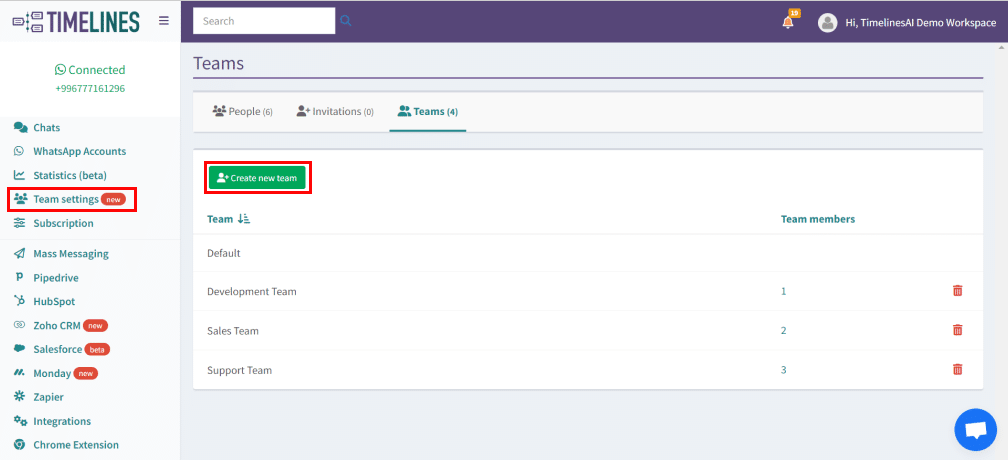
Create Isolated Teams in One Workspace

Unlock the ability to create distinct teams within a single workspace, streamlining organization and collaboration. Dive into the enhanced experience of tailored teams, roles in one centralized workspace.
Checkbox 1
Streamline collaboration by creating isolated teams within a unified workspace
Checkbox 1
Establish separate teams with allocated roles
Checkbox 1
Assign Team Supervisors to efficiently manage and oversee members within specific teams
Team settings
How PipeDrive integration works

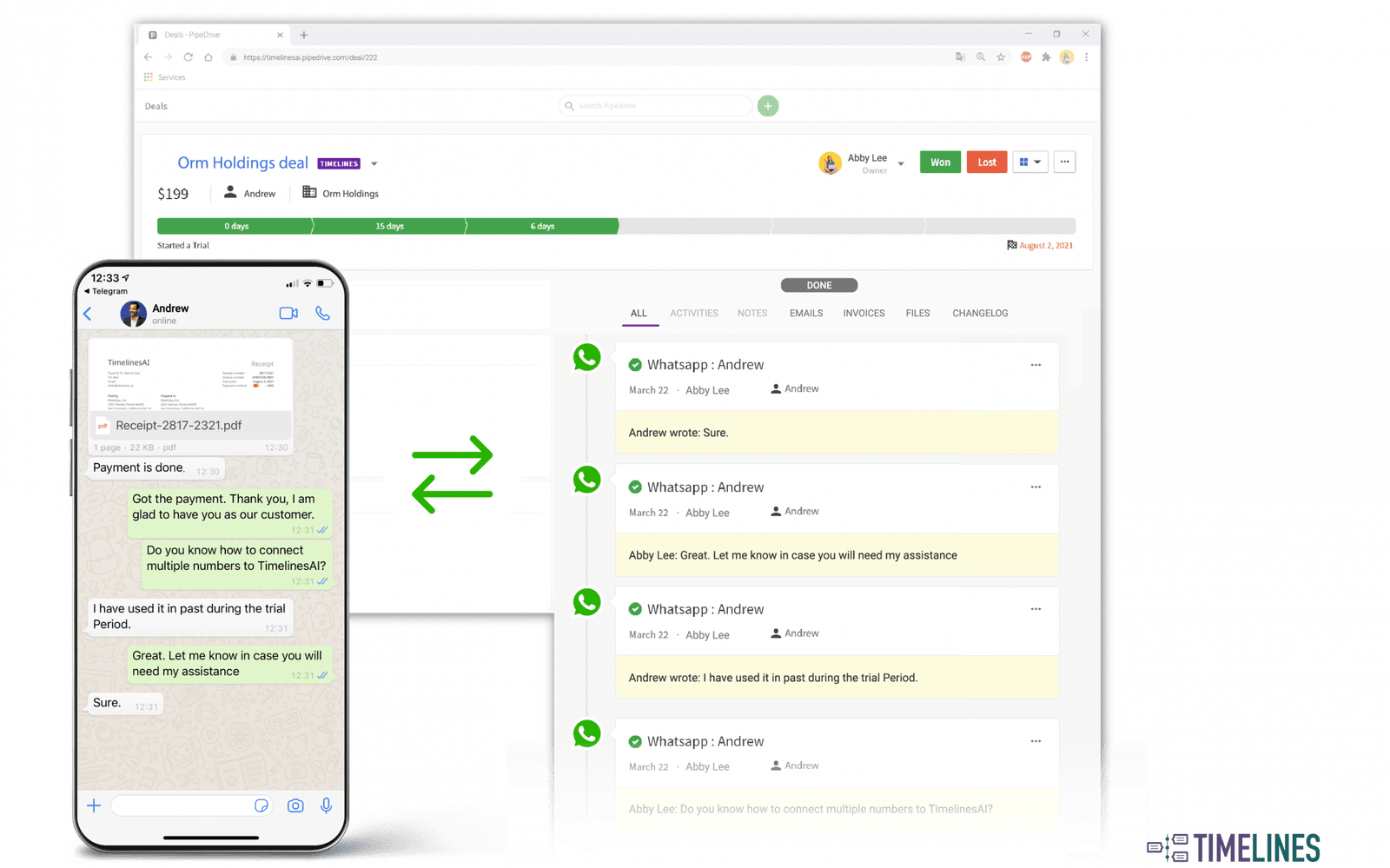
One-click WhatsApp and Pipedrive integration

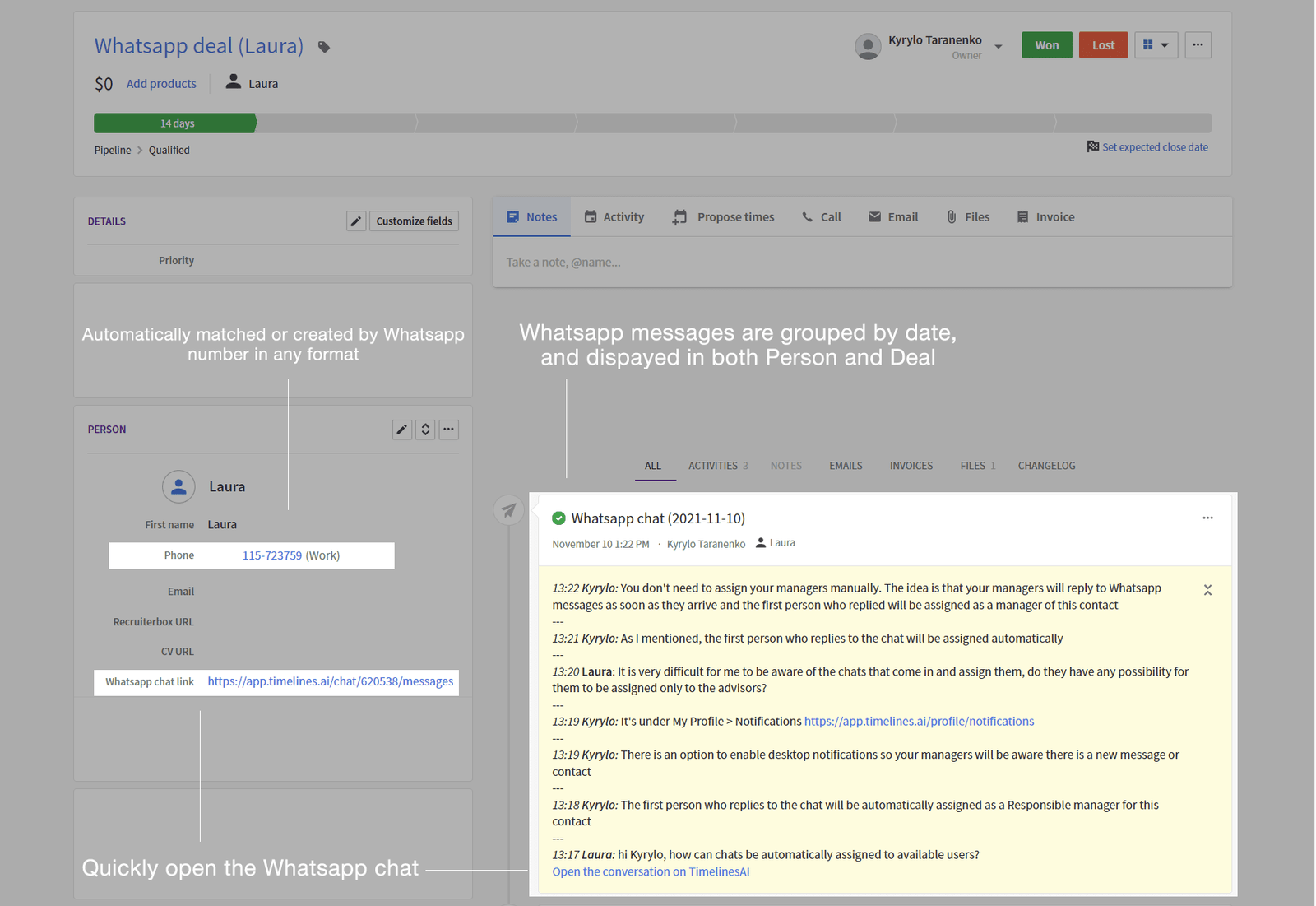
Automatically track and preserve WhatsApp Business communication in Pipedrive.
Checkbox 1
Automatically sync WhatsApp messages into Pipedrive
Checkbox 1
Automatically create Persons, Leads and Deals for new contacts from WhatsApp
Checkbox 1
Start new WhatsApp chats right from the Pipedrive interface
Checkbox 1
Efficiently sync WhatsApp contacts to your preferred pipeline
Checkbox 1
Select the perfect Pipedrive module for your new contacts

One-click WhatsApp and Hubspot integration

Start tracking WhatsApp business communication with automatic updates into HubSpot’s Contacts and Deals.
Checkbox 1
Automatically sync WhatsApp messages into Hubspot
Checkbox 1
Automatically create Contacts and Deals for new contacts from WhatsApp
Checkbox 1
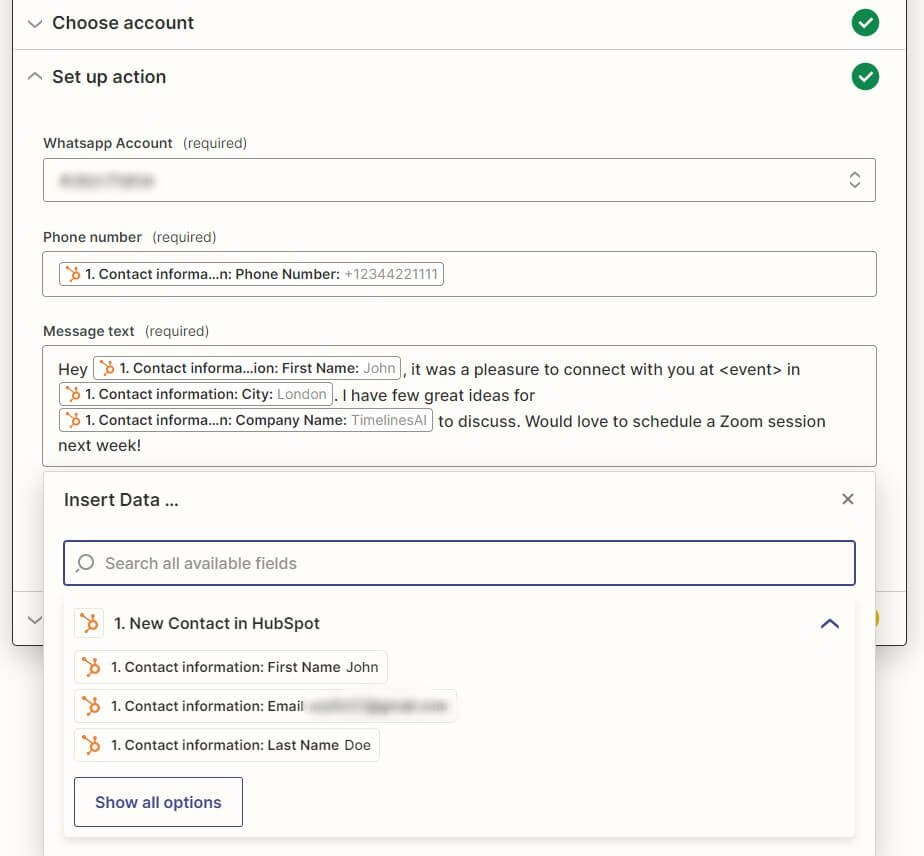
Send automated messages on WhatsApp from the Hubspot workflow interface
Hubspot new integration
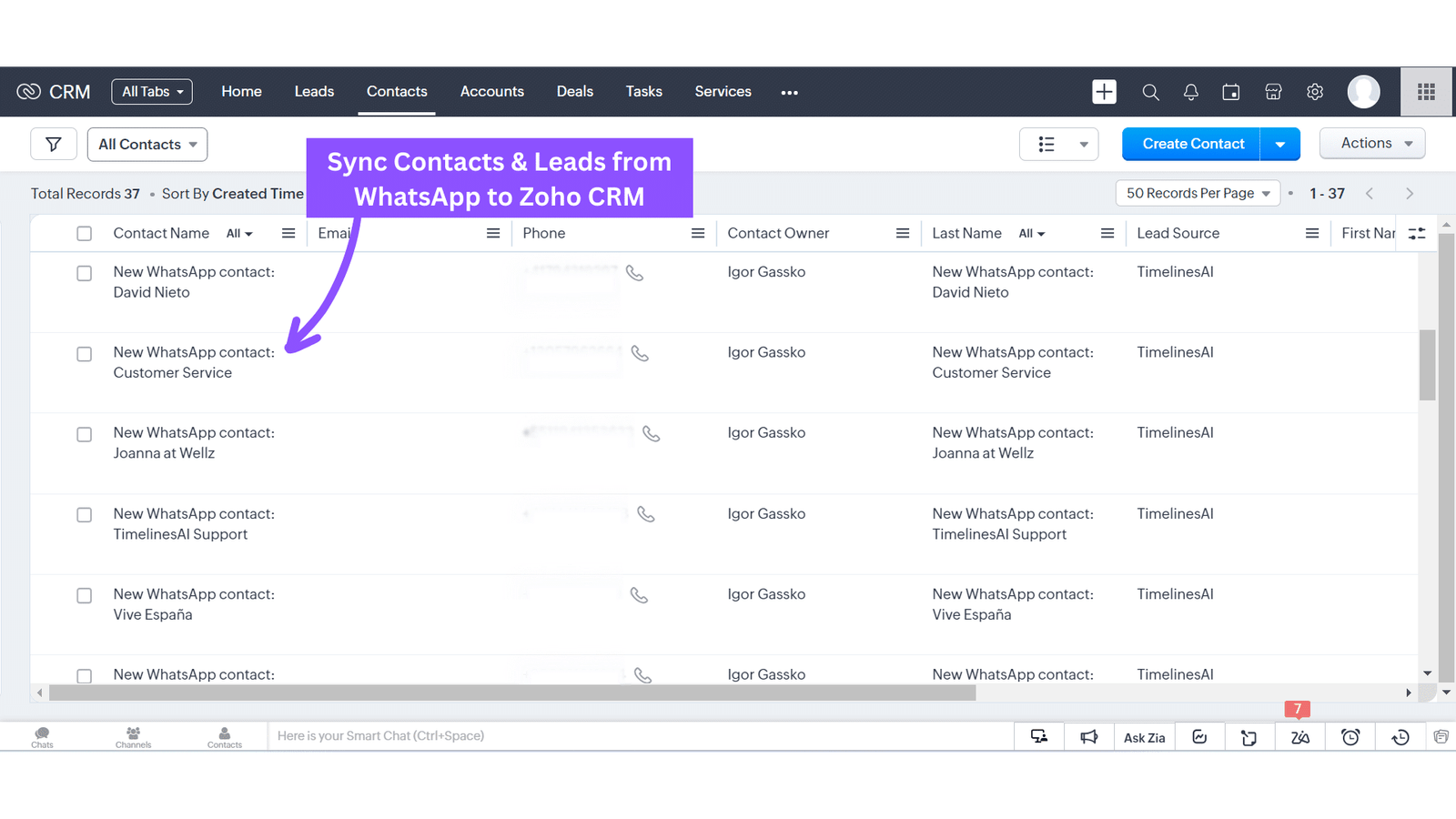
Sync Contacts and Leads from WhatsApp

Seamless WhatsApp-Zoho Integration

Connect WhatsApp with Zoho in just one click, and effortlessly synchronize your contacts from WhatsApp to Zoho.
Checkbox 1
Automatically create new Contacts and Deals for incoming WhatsApp chats on Zoho
Checkbox 1
Choose a module to sync contacts from WhatsApp
Checkbox 1
Sync WhatsApp messages to Zoho CRM
Checkbox 1
Customize workflows for automated actions
Checkbox 1
Initiate chats and review WhatsApp message history directly within your CRM interface

Effortless Salesforce and WhatsApp Integration

Enhance your business communication with seamless integration between Salesforce and WhatsApp. Automate lead and contact creation, sync WhatsApp chats effortlessly, and streamline your messaging directly from Salesforce.
Checkbox 1
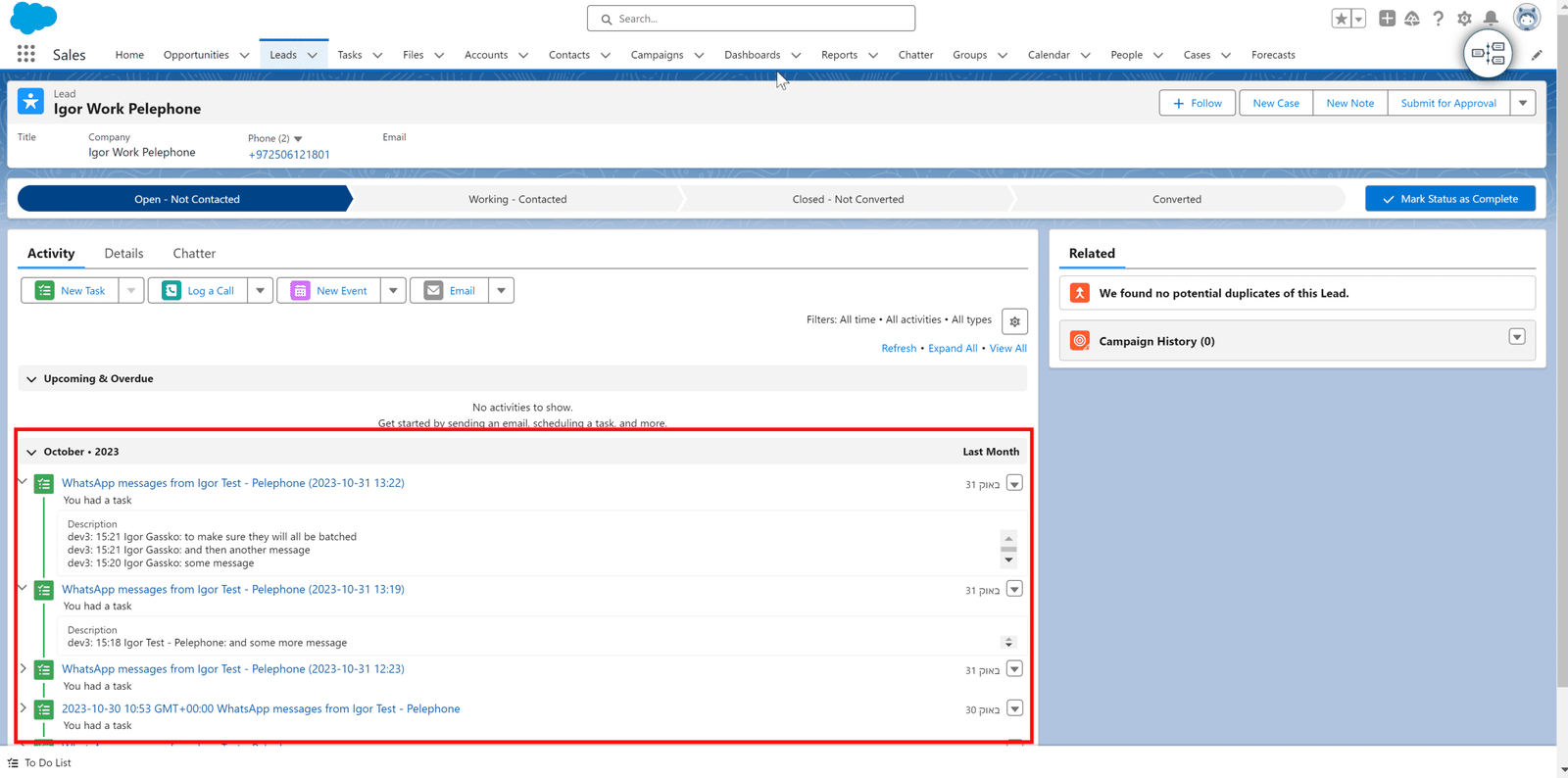
Automatically create Leads and Contacts from new WhatsApp chats in Salesforce
Checkbox 1
Synchronization of WhatsApp Chats to your Salesforce platform
Checkbox 1
Start and continue WhatsApp conversations directly within Salesforce
Checkbox 1
Automate messaging with personalized WhatsApp messages
WhatsApp chats sync is Salesforce
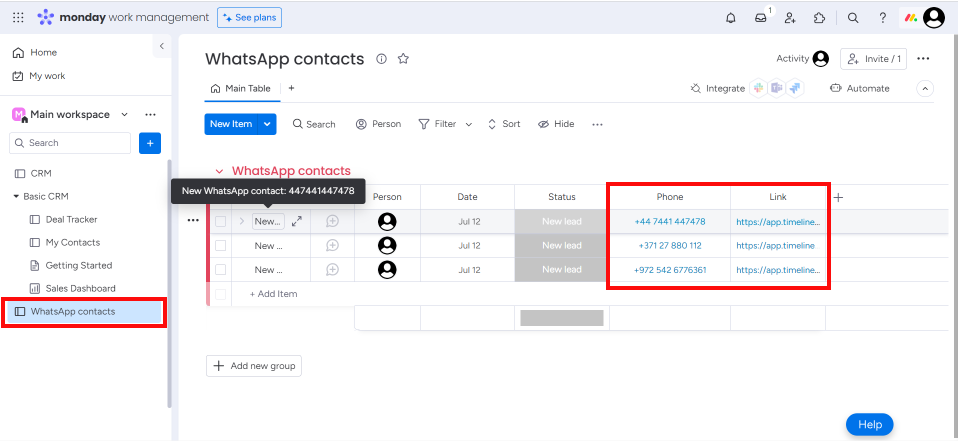
automatically sync contact to Monday

Seamless WhatsApp Integration with monday.com CRM

Easily link your WhatsApp to monday.com CRM and automatically generate updates in monday.com CRM for each new chat received on WhatsApp.

Checkbox 1

Automatically create updates in monday.com for all incoming WhatsApp chats

Checkbox 1

Initiate and continue WhatsApp conversations directly from your monday.com dashboard

Checkbox 1

Effortlessly configure automated messages triggered by specific events in monday.com

Instantly connect WhatsApp with other 1000+ tools

Set up triggers in your CRM and send personalized automated WhatsApp messages.
Checkbox 1
Personalize Welcome messages on WhatsApp
Checkbox 1
Send confirmations when something is booked on your website
Checkbox 1
Create a task and assign a responsible agent when a new chat is received on WhatsApp
Checkbox 1
Add attachments to automated messages, such as illustrations, files, and videos
whatsapp zapier integration 1
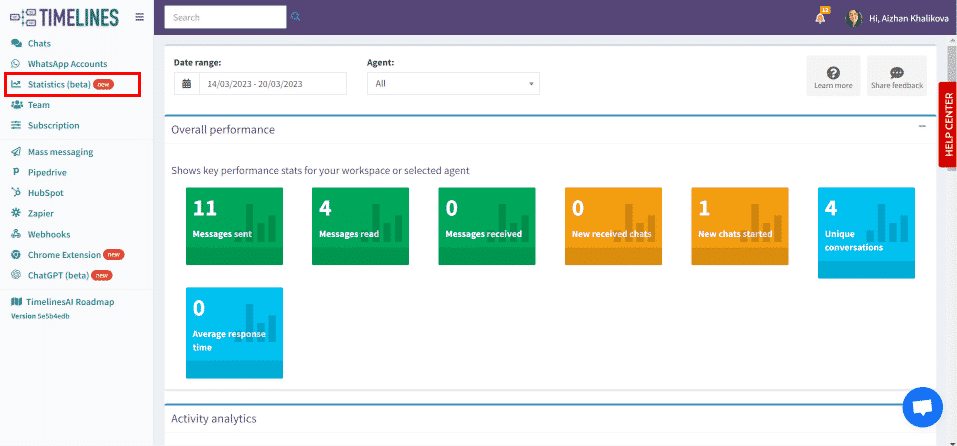
statistica dashboard

Make data-driven decisions and optimize customer communication on WhatsApp

TimelinesAI provides businesses with key metrics to help evaluate the effectiveness of WhatsApp business communications.
Checkbox 1
Determine your team’s performance while using their WhatsApp accounts
Checkbox 1
Get an insight into how active your account is in the specific time period
Checkbox 1
Understand how your team and agents are performing

Launch mass messaging campaigns on WhatsApp

TimelinesAI enables your team to send Mass Messaging to the custom lists of your contacts on Whatsapp. You can easily send marketing messages, updates, news, and upsell services to your customers.
Checkbox 1
Send personalized mass messages
Checkbox 1
Track delivery of mass messages
Checkbox 1
Schedule Mass messaging campaigns
unpload csv file
whatsapp message history

Start and continue conversations on WhatsApp directly from your CRM / ATS with TimelinesAI WhatsApp chrome extension

WhatsApp direct message chrome extension will automatically detect phone numbers from your CRM or any other webpage, providing easy access to WhatsApp conversations.
Checkbox 1
Automatically detect phone numbers from your tool
Checkbox 1
Preview WahtsApp messages history
Checkbox 1
Instantly start or continue WhatsApp chat from any CRM/ ATS

Integrate TimelinesAI with any CRM systems and tools

Say goodbye to the headaches associated with manual data entry to your CRM. You’ll never miss a conversation and have all of your customer data in one place, enabling you to enhance engagement, productivity, and customer satisfaction.
Checkbox 1

Use Webhooks to integrate WhatsApp chats into your CRM

Checkbox 1
Use Public API to automate sending WhatsApp messages
web 2
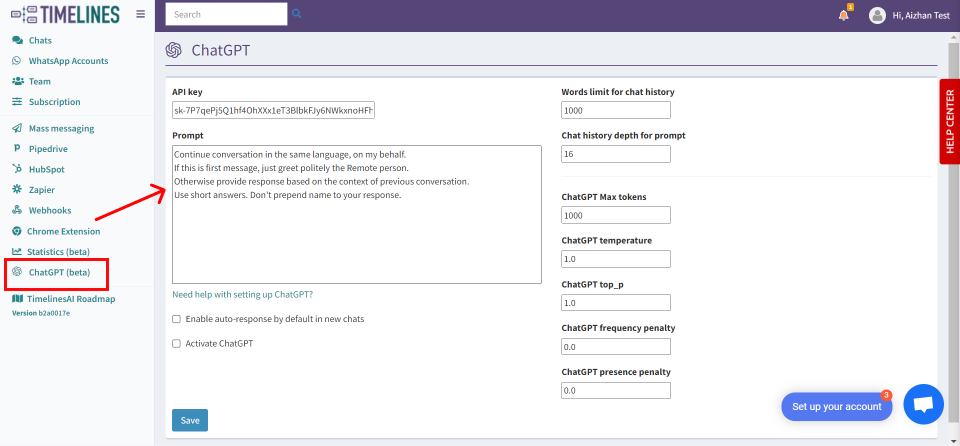
chatgpt

Create ChatGPT autoresponder for WhatsApp in minutes

Don’t waste any more time manually responding to WhatsApp messages. Experience the convenience and efficiency of the ChatGPT Whatsapp autoresponder without coding skills.
Checkbox 1
Automatically answer your business messages on WhatsApp
Checkbox 1
Get a multilingual autoresponder on WhatsApp
Checkbox 1
Quick setup, no coding skills are required

Generate a WhatsApp Chat Summary with ChatGPT

With the ChatGPT Integration on TimelinesAI, you can generate a chat thread summary, to get a brief overview of a conversation with your contacts on WhatsApp.
Checkbox 1
Generate detailed chat summaries effortlessly with ChatGPT Integration on TimelinesAI
Checkbox 1
Get a brief and comprehensive overview of your WhatsApp conversations to stay informed and efficient
chatGPT chat summary

Frequently asked questions

Learn more about Whatsapp Zapier integration

Yes, with TimelinesAI, you can send all kinds of attachments from WhatsApp (images, videos, voice records, and files).

You can connect regular and business WhatsApp numbers. No Whatsapp Business API is required.
Yes, TimelinesAI enables your team to reply to regular and group chats. You may try it for free on the TimelinesAI app. 
You can create a filtered view by applying filter criteria by phone number.
As many as you need depending on the plan, TimelinesAI pricing is based on seats, and one seat enables a user to connect one Whatsapp account.

Discover more. 

WhatsApp, Facebook and Instagram’s share of social media messaging is unrivaled. Harness it with one of the fastest growing WhatsApp Business Solution Providers.
MultiDevice Whatsapp Shared Inbox for Teams interface 2048x1538 1 1

NewTimelinesAI Partner API

Launch a White-Label WhatsApp Solution Under Your Brand

X