Multi-Number WhatsApp Management System for WhatsApp Agencies

With our WhatsApp multi-agent solution, businesses can efficiently manage client communications while maintaining privacy and security:
Checkbox 1

Enhanced Privacy: Control access to specific conversations, ensuring team members only view relevant data, safeguarding client privacy.

Checkbox 1

Streamlined Service Delivery: Improve response times by up to 50%, boosting communication efficiency across all accounts managed from a single platform.

Checkbox 1

Manage Multiple Accounts: Seamlessly handle up to 100 WhatsApp numbers from one dashboard for streamlined operations.

No card icon 1png
100% Functional, No Commitment.
No credit card required.
new main illustration 1 e1690290628352 508

Easy Setup, Powerful Results for Your Business

TimelinesAI is designed specifically for agencies, offering an out-of-the-box solution for remote WhatsApp management and streamlined client communication.
Shape

Quick Setup, Instant Results

Get started within minutes by simply scanning a QR code and inviting your team. Follow one-click setup – simply register on the TimelinesAI  app, invite clients via email, and have them connect their WhatsApp by scanning a QR code.
Shape 1

All-in-One Communication Hub

Add multiple WhatsApp numbers to a single inbox for full control and visibility, enabling a 360° view of all business conversations without unnecessary complexity. Centralizing client interactions ensures nothing is missed, and teams can focus on delivering exceptional service.

Shape 2

Effortless Collaboration

Prepare your team for seamless WhatsApp collaboration with advanced CRM tools. Assign agents to specific conversations, use pre-built message templates, and enable bulk replies, saving time while boosting overall performance.

Shape 3

Privacy-Driven Client Management

Gain complete control over your clients’ WhatsApp conversations while maintaining privacy and confidentiality. Set strict access permissions to ensure team members only see relevant conversations, protecting sensitive information and minimizing the risk of errors.

Features That Simplify Your WhatsApp Workflow

TimelinesAI offers a powerful WhatsApp management tool that enhances your team’s productivity while ensuring secure and efficient client communication. Below are key features that help businesses deliver a seamless customer experience:

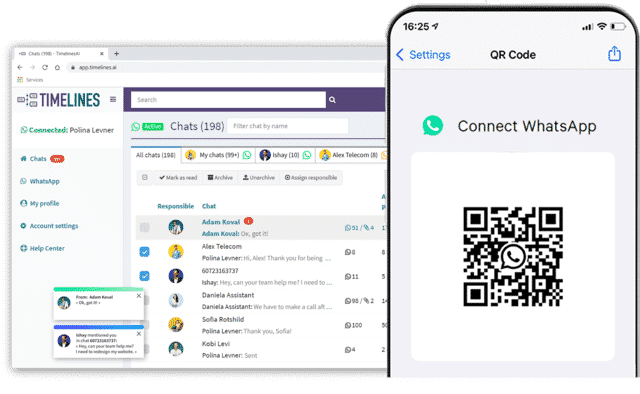
MultiDevice Whatsapp Shared Inbox for Teams interface 2048x1538 1 1

Manage Multiple WhatsApp Accounts Securely

Handle multiple client WhatsApp accounts effortlessly without granting access to sensitive numbers. This feature provides full control and security, making it easy to switch between client accounts while maintaining privacy.

Checkbox 1
Seamlessly navigate between different client accounts
Checkbox 1

Ensure each account is isolated and protected

Checkbox 1

Maintain full privacy and data security

Centralized Shared Inbox for Multiple WhatsApp Numbers

Gain complete control over business communications with a 360° view of all WhatsApp interactions. Manage multiple accounts, share resources, and collaborate effortlessly with your team from a unified inbox.

Checkbox 1
Add multiple WhatsApp numbers to a single inbox
Checkbox 1

Respond to messages, send images, videos, and documents

Checkbox 1

Manage group WhatsApp chats and collaborate with your team using bulk replies, analytics, and ChatGPT autoresponders

Connect Whatsapp 640
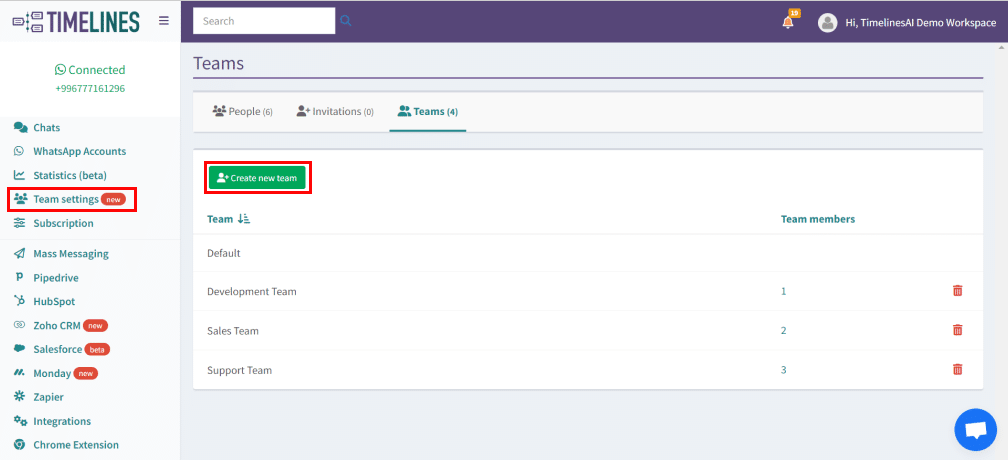
Team settings

Create Isolated Teams in One Workspace

Streamline team collaboration by creating isolated teams, each with tailored roles and permissions. This feature optimizes organization within your workspace, enabling team supervisors to efficiently manage and oversee members.

Checkbox 1

Establish isolated teams with specific roles

Checkbox 1

Assign team supervisors for better oversight and management

Send Mass Messages on WhatsApp with Ease

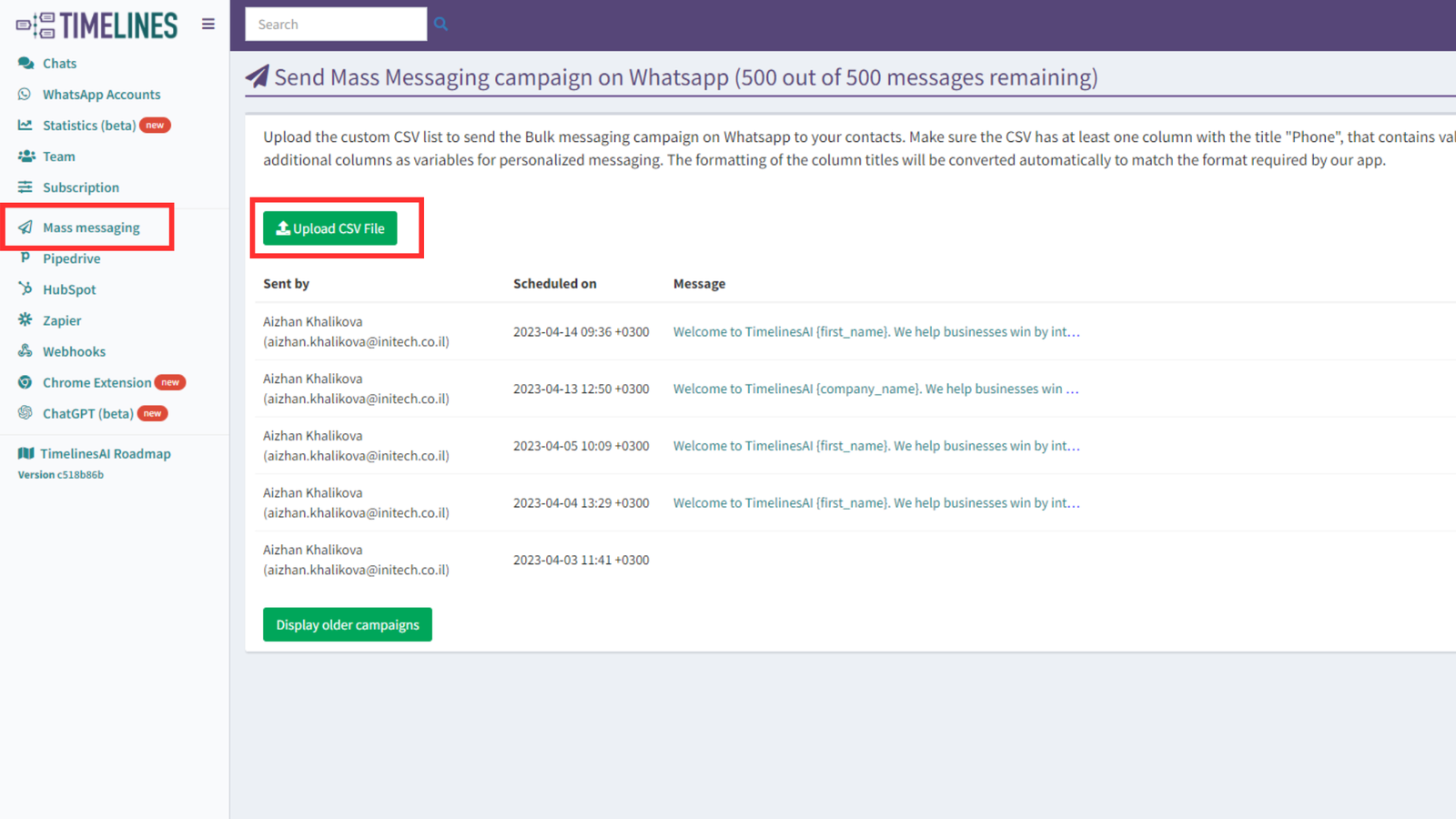
Effortlessly send mass messages to your WhatsApp contacts with instant messaging. Upload contact lists, personalize messages, and manage bulk replies, all while tracking the delivery of your campaign.

Checkbox 1
Upload contacts via Excel/CSV and send personalized messages
Checkbox 1
Export delivery reports for campaign analysis
Checkbox 1
Send bulk replies by selecting relevant chats
upload CSV

Enhance Your Workflow with Simple, Flexible Integrations

Maximize your team’s efficiency with seamless integrations that automate workflows and streamline communication across all major platforms.

Revolutionize Your Business in Just a Click

Transform your business communication with TimelinesAI. Our WhatsApp management system simplifies workflows, boosts productivity, and enhances your customer interactions – all from one powerful platform. 

Don’t miss the opportunity to elevate your team’s performance – start your free 10-day trial now and take control of your communication like never before!

Start Your 10-Day Trial

Frequently Asked Questions

Learn more about our multi-number communication solution.
It’s a platform that allows businesses to manage multiple accounts from one place. It enables teams to work together seamlessly, monitor conversations, and ensure smooth client interactions while keeping data secure.
Businesses need tools to centralize customer communication, handle multiple accounts, and improve team collaboration. This helps maintain organized conversations, ensures faster responses, and enhances overall client support without compromising security.


Yes, to manage multiple WhatsApp accounts, you need the following:

  1. Invite your clients to the workspace
  2. Give them an Agent role
  3. Ask them to connect their WhatsApp account by scanning the QR code
  4. Gain complete control over your clients’ WhatsApp conversations. Respond to messages, send images, videos, and documents, and manage group chats on behalf of your clients 
To add multiple agents, use a platform like TimelinesAI. Connect your WhatsApp Business account, invite your team members to join, and assign roles as needed. This way, everyone can collaborate and handle customer inquiries effectively.
Yes. An Agent role is designed to maintain the privacy of your clients’ information. Your clients will not have access to settings or other numbers associated with the account, ensuring their data remains confidential and secure.

Yes, with TimelinesAI, you will have access to advanced analytics and reporting. The platform allows you to track the effectiveness of your WhatsApp communication, monitor team performance, and analyze key metrics such as response times, customer engagement, and message statistics.

Yes, with tools like TimelinesAI, you can monitor WhatsApp activity within your business account. This helps ensure transparency and control, allowing authorized team members to track and access messages as needed.
Discover more. 
WhatsApp, Facebook, and Instagram’s share of social media messaging is unrivaled. Harness it with one of the fastest-growing WhatsApp Business Solution Providers.
MultiDevice Whatsapp Shared Inbox for Teams interface 2048x1538 1 1

NewTimelinesAI Partner API

Launch a White-Label WhatsApp Solution Under Your Brand

X