Connect Multiple WhatsApp Accounts to Shared Inbox or CRM

If you have one or multiple Whatsapp numbers to communicate with customers or your agents carry individual Whatsapp numbers, you can easily connect and synchronize multiple Whatsapp numbers into your CRM.
new main illustration 1 e1690290628352 508

500+ brands across 34 countries use TimelinesAI

Capterra rating score : 4.5 of 5 based on 50+ reviews
Connect Whatsapp 640

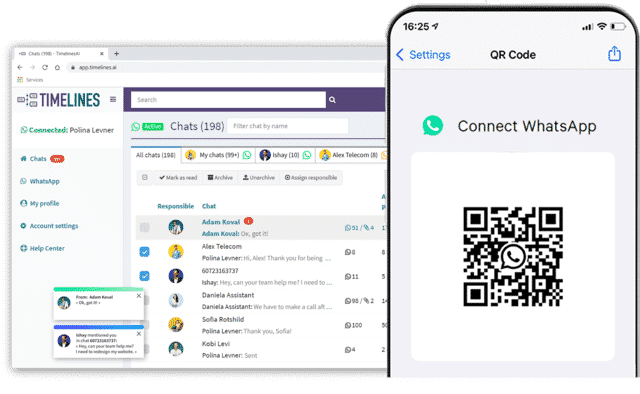
Connect a Whatsapp number in 1 minute

Connecting a Whatsapp account via TimelinesAI is similar to Whatsapp Web. All it takes is scanning a QR code, so you don’t need to wait for the approval. Try for free on the TimelinesAI app

Works with WA Web, Desktop, and mobile app

All messages seamlessly sync via Whatsapp multidevice feature. It means that your managers can focus on work using their favorite interface, and messaging will automatically sync to Shared Inbox or CRM with no extra effort from yours and their side.
1280x800f
3 WA numbers

Connect multiple Whatsapp accounts at scale

TimelinesAI enables you to connect additional WhatsApp accounts of your agents. Invite them via email and let them scan a QR code to connect multiple numbers at once. Communicate with your customers via Single or Multiple WhatsApp Numbers for your Business.

Connect regular and Business Whatsapp numbers

TimelinesAI Whatsapp CRM integration and Whatsapp Shared Inbox works with regular and business Whatsapp numbers of your managers. No WhatsApp Business API is required. Join now and start for free on the TimelinesAI app.  

Multiple numbers 1
Connect Multiple Whatsapp Numbers

Automatically sync Whatsapp Messaging of your team into CRM

Set the integration once, and always get automatic updates into your CRM. Your team will always know if there were any special deals, offers, or important discussions with your clients. Supports connection of multiple Whatsapp numbers, and groups.

Work with team in TimelinesAI Whatsapp CRM integration and Whatsapp Shared Inbox

You can easily manage your chats: rename chats, assign a chat to team members, sort the chat list by a Responsible teammate. Try for free on the TimelinesAI app.  

Whatsapp Shared Inbox TimelinesAI

Frequently asked questions

Any questions? We’ve got some answers!
It takes ~ 5 minutes to start working on Whatsapp with your team on TimelinesAI. All you need to do is connect your number and invite your agents to collaborate.
TimelinesAI works with any type of Whatsapp numbers. You also get to upload your Whatsapp chat history. This way, even if you decide to switch from using Whatsapp, the messaging with your clients will remain searchable and accessible to you and your team.
As many as you need depending on the plan. TimelinesAI pricing is based on seats. One seat enables a user to connect one Whatsapp account.

It’s possible to deactivate the sync for selected personal contacts, so the messages with them won’t appear on TimelinesAI and won’t get synced to a CRM. 

Yes, TimelinesAI supports all kinds of attachments from WhatsApp

Yes, we offer 10 days of a free trial, no credit card is required. Connect your Whatsapp profile for free on the TimelinesAI app.  

Discover more. 

WhatsApp, Facebook and Instagram’s share of social media messaging is unrivaled. Harness it with one of the fastest growing WhatsApp Business Solution Providers.
MultiDevice Whatsapp Shared Inbox for Teams interface 2048x1538 1 1

NewTimelinesAI Partner API

Launch a White-Label WhatsApp Solution Under Your Brand

X